Exchange Online outage: reading your mail from a backup while Microsoft 365 is down
 By Lucas Flores, IT Systeme Flores UG. Last updated
On Thursday, 12 November 2026, at 16:20 UTC, most users of Microsoft 365 lost access to their Exchange Online mailbox. Outlook and other mail clients could not open it, and mail was delayed. Microsoft gives the end of the impact as 16:10 UTC the next day: almost a full day. This post looks at what happened, what still worked, and what a backup that runs outside Microsoft can and cannot do for you while Exchange Online is down.
What happened on 12 and 13 November
Microsoft published a preliminary post-incident report on 15 November for the incidents EX1550543 (Exchange Online) and MO1550821 (the other affected services). In short: [1]
- Duration: from Thursday, 12 November, 16:20 UTC to Friday, 13 November, 16:10 UTC. The severity varied by region, connection method and time; access was partial or intermittent at times.
- Impact: most users could not reach their mailbox through Outlook or other mail clients, and mail delivery was delayed for many. Parts of Teams, SharePoint, OneDrive, Copilot, Defender and Purview that use Exchange Online were affected too.
- Cause: a latent defect in the servers of the networking gateway in front of many Microsoft 365 services. More load after an automatic failover of Teams traffic, and nearly 14 % of the gateway capacity being out of service for an unrelated reason, brought it out; the failure then cascaded until, at its lowest, more than 80 % of the servers were unresponsive. Teams, OneDrive, SharePoint and the Office apps could move off the faulty gateway and recovered earlier. Exchange Online could not, for reasons of scale.
- Mail delivery: Microsoft extended the delivery window so that delayed messages were not returned as undeliverable, and processed the messages that were queued during the outage.
Microsoft said during the incident that there was no sign of an attack. The report is preliminary; Microsoft announced a final one, which may change details. [2]
What worked, and what did not
For most people, the mailbox was simply out of reach: on the web, in Outlook and on the phone. Tony Redmond's analysis adds detail: Outlook classic, which keeps an offline copy of the mailbox, fared better than the new Outlook, and mobile clients could do nothing. Clients that reach Exchange Online over ActiveSync, POP3 or IMAP were affected in the same way, because the mailbox behind them was. [2]
So for almost a day, an offer, a contract or a delivery note that existed only in the mailbox could not be opened by most of the people who needed it. That is the gap a backup outside Microsoft can close, as long as it does not depend on Microsoft itself.
What a backup outside Microsoft gives you in an outage
This holds for any backup tool. During an outage, a backup helps only if all of the following are true:
- It lives outside the service that is down. The backup itself, and the software you open it with, must be reachable without Exchange Online.
- You can sign in to it without that service. If you reach your backup only with your Microsoft account, an outage that affects Microsoft's sign-in locks you out of the backup too.
- The people who need their mail can read it themselves. If only an administrator can open the backup, every request in the outage goes through one person.
- You can read in place and export in open formats. Reading a mail in the browser is enough for most questions; EML and MBOX files open in any mail client when someone needs more.
- You know how old the newest copy is. A backup holds what its last run saw. Mail that arrives during the outage is not in it, and mail from the hours before is there only if a run caught it.
How this looks in Restow
Restow runs on your own server or VM and writes its backups to storage you choose. Reading a backup needs neither Exchange Online nor Microsoft's sign-in: people sign in to Restow with a passkey, or with a password and a code from an authenticator app. Signing in with a Microsoft 365 account is planned; Restow's own sign-in does not depend on it.
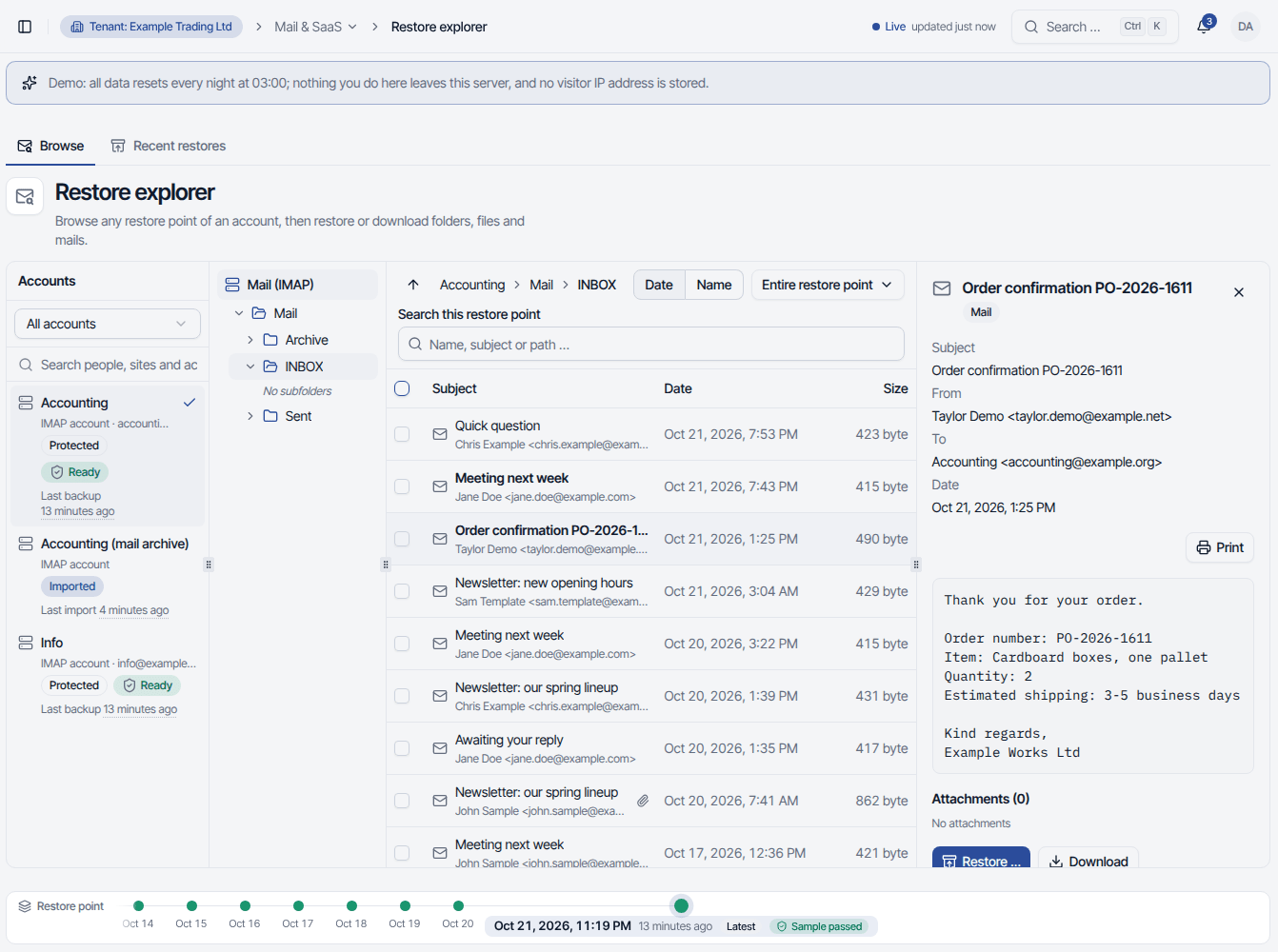
- In the Restore explorer, someone with the role User sees only their own data, as one entry marked Yours: the mailbox with mail, calendar and contacts, the OneDrive and an IMAP account. They pick a restore point, browse its folders or use Search this restore point.
- A mail opens in a reading pane with its headers, its text or HTML body and its attachments, each of which can be downloaded, and a Print button. The calendar shows as a list or a month.
- Download as ZIP gives the selected mails as .eml files, which any mail client opens, with a checksum list. The link stays valid for 24 hours.
- A Restore operator or a tenant administrator can do the same for everyone in the tenant, and export a mailbox, a folder or the results of a search as EML files in a ZIP, with a manifest and checksums, or as MBOX.
While Microsoft is down, backups that need Microsoft Graph cannot run. Restow retries a run that Graph turns away as unavailable, and a run that still ends that way reads Held back by the service, retried instead of failed. Once Microsoft is back, the next run fetches the changes through Graph delta queries. Mail you want back in the mailbox is restored into a new, clearly named folder; nothing in the mailbox is overwritten. [3][4][5][6]
What Restow cannot do in an outage
- Send or receive mail. Restow is a backup, not a stand-in mail server.
- Show mail its last run did not see. How current the newest restore point is depends on your schedule; runs can be as close as 15 minutes apart.
- Restore into Microsoft 365 while it is down. A restore into the original or another mailbox waits until Exchange Online is back; until then, read and download.
- Show rights-protected (Microsoft Purview) or S/MIME-encrypted mail in the reading pane. It can be downloaded, but opening it needs the recipient's rights.
- Replace your existing backup today. Restow is a beta: run it next to your current backup until you have checked restores against your own data.
Before the next outage: five checks
- Sign in to your backup as if Microsoft 365 were down: without the Microsoft account, from a device that does not need it.
- Give the people who need their mail in an emergency their own access, and tell them where to find it.
- Look at how old the newest restore point usually is, and decide whether that is enough for your business.
- Open one mail from the backup, download it as a file and open it in a mail client. Once is enough to know it works.
- Check that the backup can be restored at all; see how to prove that a backup can be restored.
Frequently asked
Was mail lost in the November 2026 outage?
Microsoft's preliminary report reports no loss. It says Microsoft extended the delivery window so that delayed messages were not returned to their senders as undeliverable, and that the messages queued during the outage were processed. Mail sent to you during the outage arrived late, not never.
Can I send and receive mail through my backup during an outage?
Not with a backup. A backup holds copies of what was in the mailbox at its last run; it is no mail server. Sending and receiving while Exchange Online is down needs a separate continuity service with its own mail routing. A backup gives you something different: you can read, search and hand on the mail you already had.
Can employees read their own backed-up mail in Restow without an administrator?
Yes, once they have an account in the tenant with the role User. They sign in with a passkey or with a password and a code from an authenticator app, see only their own mailbox, OneDrive and IMAP account, and can browse, read, download and restore their own data. Set this up before an outage: during one, an administrator has other work.
Sources
Read on 17 November 2026. Microsoft's report is in the Microsoft 365 admin center under Service health for administrators of affected tenants; the link leads to a public copy.
- Microsoft: Preliminary Post Incident Report for Microsoft 365, EX1550543/MO1550821, 15 November 2026 (PDF).
- Tony Redmond, Office 365 for IT Pros: The Great Exchange Online Outage of November 2026, 16 November 2026.
- Restow documentation: Finding and restoring your data
- Restow documentation: Team and roles
- Restow documentation: Mail file import and export
- Restow documentation: Failure explanations
Microsoft's current service status: status.cloud.microsoft